Samsung A055F FRP Bypass Android 15 | Samsung A05 FRP Bypass Guide
Complete guide to bypass FRP on Samsung Galaxy A055F running Android version 15 using Samfw firmware tool.

What is FRP (Factory Reset Protection)?
Factory Reset Protection (FRP) is a security feature in Android devices that prevents unauthorized access after a factory reset. This guide will help you bypass FRP on Samsung A055F running Android 15 safely and effectively.
Step 1 – Prepare Your Tools
Download the required Samfw Firmware Tool. Ensure your phone is charged above 50%, and use a USB cable to connect it to your computer.
First, open the tool and check that your device is properly attached and running Android version 15. Confirm that FRP lock is active before proceeding.
Step 2 – Download Firmware
Find your device’s firmware version in your phone. For example, if your version is A055FXXS9DYG7, go to:
https://samfw.com/firmware/SM-A055F/INS
Download the firmware file that exactly matches your version. For instance, if your firmware is A055FXXS9DYG7, download that file only.
Step 3 – Flash the Firmware
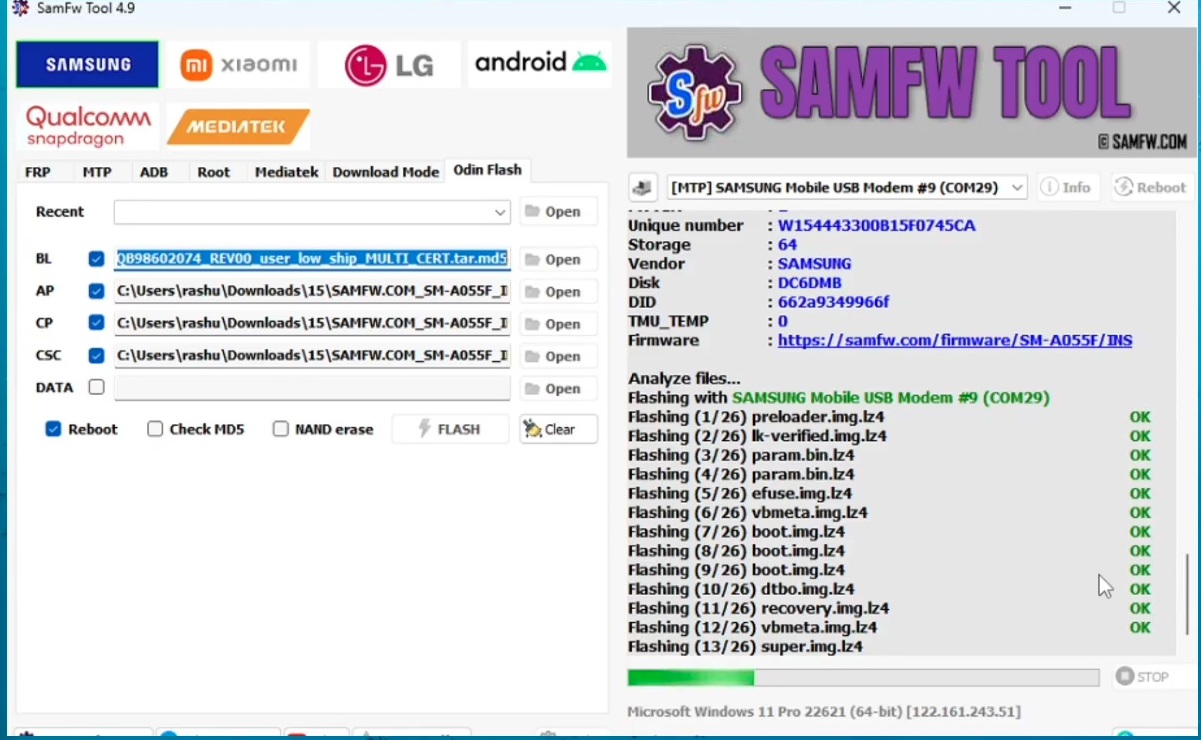
After downloading, extract the firmware files. Use flashing tools like Odin or Samfw to flash the following partitions correctly:
- BL – Bootloader
- AP – Main firmware
- CP – Modem
- CSC – Consumer Software Customization
Select each file carefully and click on the flash button. The flashing process will start and once completed, FRP lock will be removed automatically.
Step 4 – Verify Security Patch Level
This method is valid for phones with security patch level 2025-05-01. Also, ensure that your phone’s BIT version is 9 (BINARY/U/SW REV.). If both conditions match, this trick will work successfully.
Step 5 – Complete the Setup
After flashing, the phone will reboot. You can now set up the device without entering the previously synced Google account details.