UnlockTool 2026.07.30.0
Complete Download, Installation & Features Guide for Professional Android Servicing
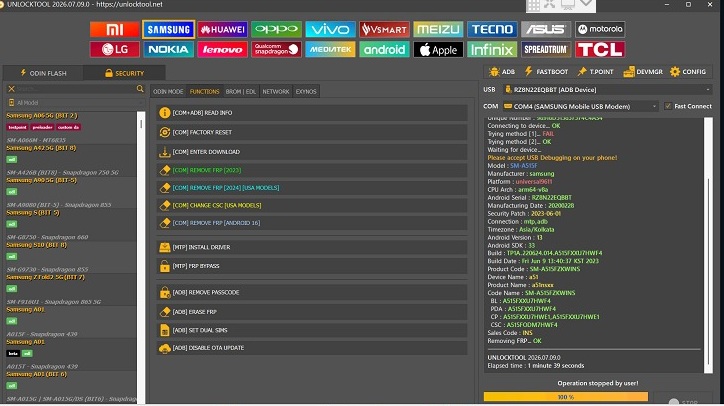
Figure 1: UnlockTool 2026.07.30.0 Professional Android Servicing Interface
📄 Table of Contents
💡 Introduction to UnlockTool
UnlockTool is a professional Android servicing software widely used by mobile repair technicians and service centers worldwide. It provides comprehensive maintenance operations including firmware flashing, device information reading, factory reset, FRP bypass, and various other service functions for supported Android devices.
The 2026.07.30.0 release brings significant improvements focusing on enhanced compatibility with newer device models, updated chipset loaders, improved stability, and expanded brand support. Whether you are a professional technician or running a mobile repair business, UnlockTool offers a reliable and efficient solution for device servicing.
This guide covers everything you need to know about UnlockTool 2026.07.30.0 — from downloading and installation to activation, features, and troubleshooting common issues.
⚙️ Main Features of UnlockTool
UnlockTool 2026.07.30.0 comes packed with powerful features designed for professional mobile servicing:
📱 Multi-Brand Support
Professional support for Samsung, Xiaomi, Redmi, POCO, OPPO, Vivo, Realme, Motorola, Tecno, and Infinix devices.
🔧 Samsung Servicing
Complete service and flash functions for Samsung smartphones with regular model updates.
🔌 Xiaomi / Redmi / POCO
Full EDL and Fastboot mode support for Xiaomi ecosystem devices including advanced flashing options.
💻 MediaTek & Qualcomm
Advanced functions for both MediaTek (MTK) and Qualcomm (QC) chipsets with updated loaders.
📄 Device Information Reader
Read complete device information including IMEI, serial number, firmware version, and hardware details.
⚡ Firmware Flashing
Flash official and custom firmware packages with verification and error-checking mechanisms.
🔙 Factory Reset
Perform secure factory resets on supported devices while maintaining device integrity.
🔄 Regular Updates
Frequent software updates ensure compatibility with the latest devices and security patches.
🎉 What's New in Version 2026.07.30.0
The latest UnlockTool 2026.07.30.0 update includes several important improvements:
- Compatibility Improvements: Enhanced support for newly released smartphone models across all major brands.
- Updated Loaders: Latest chipset loaders for improved connection stability and flashing success rates.
- Stability Enhancements: Bug fixes and performance optimizations for smoother operation.
- Security Patches: Updated security protocols for safer device servicing operations.
- UI Improvements: Refined user interface for better navigation and workflow efficiency.
Important: Always download UnlockTool from official sources only. Using unofficial or cracked versions may compromise your device security and void warranties.
💻 System Requirements
Before installing UnlockTool 2026.07.30.0, ensure your PC meets the following minimum requirements:
| Requirement | Minimum Specification | Recommended |
|---|---|---|
| Operating System | Windows 10 (64-bit) | Windows 11 (64-bit) |
| RAM | 4 GB | 8 GB or higher |
| Processor | Intel Core i3 or equivalent | Intel Core i5 / i7 or AMD Ryzen 5/7 |
| Storage Space | 2 GB free space | 10 GB free space (for firmware files) |
| Internet Connection | Required for activation | Stable broadband connection |
| USB Ports | USB 2.0 | USB 3.0 or higher |
Pro Tip: For best performance, use a dedicated PC for mobile servicing work. Keep your Windows updated and disable antivirus temporarily during installation if needed.
📥 Official Download Sources
Always download UnlockTool from official sources to ensure you get the genuine, malware-free software. Here are the verified download links:
Security Notice: Never download UnlockTool from third-party websites or torrents. Unofficial versions may contain malware, viruses, or stolen credentials that can harm your PC and compromise client devices.
🔧 Step-by-Step Installation Guide
Follow these steps carefully to install UnlockTool 2026.07.30.0 on your Windows PC:
Download the Latest Installer
Visit the official website or file server and download the latest UnlockTool 2026.07.30.0 installer package. The file is usually provided as a ZIP archive.
Extract the ZIP Package
Right-click on the downloaded ZIP file and select "Extract All" or use software like WinRAR/7-Zip. Extract the contents to a dedicated folder on your C: drive.
Run Setup as Administrator
Navigate to the extracted folder, locate the Setup.exe file, right-click on it, and select "Run as Administrator." This ensures the software has proper permissions to install system components.
Install USB Drivers
During installation, you will be prompted to install USB drivers for various chipsets (Qualcomm, MediaTek, Samsung, etc.). Install all recommended drivers to ensure device compatibility.
Restart Your PC
After installation completes, restart your computer if prompted. This ensures all drivers and system components are properly loaded.
Installation Tip: Disable Windows Defender or other antivirus software temporarily during installation, as some security tools may flag servicing software. Remember to re-enable protection after installation.
🔓 Activation Process
After installation, you need to activate UnlockTool using your licensed account. Follow these steps:
- Open UnlockTool: Launch the application from your desktop or start menu.
- Login: Enter your licensed account credentials (username and password) provided at purchase.
- Verify Subscription: The software will verify your active subscription with the server.
- Activation Complete: Once verified, your status will change to "Activated" and all features will be unlocked.
Important: An active internet connection is required for the activation process. Ensure your firewall or antivirus is not blocking UnlockTool's connection to the activation server.
📱 Supported Brands & Functions
UnlockTool 2026.07.30.0 supports a wide range of Android brands with specific servicing functions:
| Brand | Support Status | Available Functions |
|---|---|---|
| Samsung | Fully Supported | Service & Flash, FRP Remove, IMEI Repair |
| Xiaomi / Redmi / POCO | Fully Supported | EDL Mode, Fastboot Flash, Account Remove |
| OPPO | Fully Supported | MTK Flash, QC Flash, Demo Remove |
| Vivo | Fully Supported | Flash, Account Remove, Pattern Unlock |
| Realme | Fully Supported | Service Functions, Flash |
| Motorola | Supported | Flash, FRP, Bootloader Unlock |
| Tecno / Infinix | Supported | Flash, FRP, Format |
Note: Supported functions may vary depending on the specific device model and security patch level. Always check the latest compatibility list before servicing.
💻 Supported Chipsets
UnlockTool provides comprehensive support for the following mobile chipsets:
- Qualcomm (QC): Full support for Snapdragon series including EDL mode operations.
- MediaTek (MTK): Complete BROM and preloader support for MTK devices.
- Exynos: Samsung's in-house chipset support for selected models.
- Unisoc (Spreadtrum): Growing support for budget device chipsets.
- Kirin (Selected): Limited support for Huawei devices with Kirin processors.
Tip: Make sure you have the correct USB drivers installed for the specific chipset of the device you are servicing. Using wrong drivers is the most common cause of connection failures.
⚖️ Advantages & Limitations
Before purchasing UnlockTool, consider the following advantages and limitations:
✅ Advantages
- Regular software updates with new device support
- Wide brand and model compatibility
- Professional and user-friendly interface
- Multiple chipset support (Qualcomm, MediaTek, Exynos)
- Reliable customer support and community
- Secure and official servicing methods
❌ Limitations
- Requires paid license/subscription
- Internet connection needed for activation
- Model support varies by region and variant
- Correct drivers must be installed manually
- Some advanced features require specific hardware modes
- Not compatible with macOS or Linux
🔧 Troubleshooting Common Issues
Encountering problems while using UnlockTool? Here are solutions to common issues:
| Issue | Possible Cause | Solution |
|---|---|---|
| Device Not Detected | Missing or incorrect USB drivers | Reinstall official USB drivers and try a different USB port (preferably USB 2.0). |
| Login Failed | Expired license or connection issue | Verify your license status on the official website and check your internet connection. |
| Flashing Error | Incompatible firmware or old version | Use the exact matching firmware for your device model and update to the latest UnlockTool version. |
| Driver Error | Corrupted or conflicting drivers | Uninstall old drivers completely and install the latest official chipset drivers. |
| Activation Failed | Firewall or antivirus blocking | Temporarily disable firewall/antivirus and ensure UnlockTool has internet access. |
| Slow Performance | Insufficient system resources | Close unnecessary programs and ensure your PC meets the recommended requirements. |
❓ Frequently Asked Questions (FAQ)
Got questions about UnlockTool? Find answers to the most commonly asked questions below:
No, UnlockTool is not free. It requires a valid paid license or subscription purchased from the official website. The license grants you access to all features, regular updates, and customer support.
Windows 10 and Windows 11 (64-bit) are the recommended operating systems for UnlockTool 2026.07.30.0. The software may not function correctly on Windows 7, 8, or older versions.
Yes, UnlockTool fully supports Samsung devices for service and flash functions. However, the specific supported functions depend on your device model, security patch level, and the software version you are using.
Yes, absolutely. Regular updates are essential as they provide improved device compatibility, support for new models, bug fixes, security patches, and stability enhancements. Always keep your software updated to the latest version.
UnlockTool supports major mobile chipsets including Qualcomm (Snapdragon), MediaTek (MTK), Samsung Exynos, Unisoc (Spreadtrum), and selected Huawei Kirin processors.
No, an active internet connection is required for the initial activation and periodic license verification. Some offline functions may work temporarily, but full functionality requires internet access.
Always download UnlockTool exclusively from the official website (unlocktool.net) or the official file server (file.unlocktool.net). Avoid third-party websites, torrents, or unofficial sources to prevent malware infections.
📝 Conclusion
UnlockTool 2026.07.30.0 stands out as one of the most reliable and comprehensive Android servicing solutions available for professional mobile repair technicians. With its broad device compatibility, regular updates, multi-chipset support, and professional-grade features, it offers everything needed for efficient device maintenance.
Whether you need to flash firmware, remove FRP locks, perform factory resets, or read device information, UnlockTool provides a secure and stable environment for all supported operations. Remember to always use official download sources, keep your software updated, and follow proper procedures to ensure successful servicing.
If you found this guide helpful, consider bookmarking it for future reference and sharing it with fellow technicians. For any questions or issues not covered in this guide, refer to the official UnlockTool support channels.
Legal Disclaimer: Use servicing tools only on devices you own or are explicitly authorized to repair. Unauthorized servicing of devices may violate terms of service and local laws. Always respect user privacy and data protection regulations.
Download UnlockTool 2026.07.30.0 Now
Get the latest version from the official website and start servicing supported Android devices professionally.